Redesigning your website is a significant business initiative, not merely a cosmetic update. It's a strategic opportunity to realign your digital presence with core business objectives, enhance user experience, and drive measurable growth. A successful project hinges on meticulous planning and a clear understanding of every stage, from initial discovery to post-launch analysis. Without a structured approach, redesigns can easily drift off-course, leading to budget overruns, missed deadlines, and a final product that fails to deliver a return on investment.
This comprehensivewebsite redesign checklistis engineered to prevent those pitfalls. We've broken down the entire process into ten crucial, actionable stages that cover the full project lifecycle. This guide is specifically designed for business owners, providing a clear roadmap to navigate the complexities of a modern web development project. We'll move beyond the basics, offering a prioritised framework that covers everything from strategic planning and user research to content strategy, technical SEO, and robust testing protocols.
You will learn how to audit your current site's performance, define clear goals and KPIs, and conduct thorough market analysis. We'll guide you through planning your site's structure, creating a compelling visual identity, and developing prototypes that validate your design choices. Furthermore, for businesses whose sites are built on powerful frameworks like Laravel, weâll touch on specific technical considerations essential for building a scalable and secure platform. Think of this checklist as your project's foundation, ensuring every decision is deliberate, data-informed, and directly contributes to a successful launch and long-term digital success.
Before embarking on a website redesign, it is crucial to first conduct a thorough audit of your current site. This foundational step involves gathering quantitative and qualitative data to understand what works, what doesnât, and how users actually interact with your platform. A data-driven approach ensures your redesign decisions are based on evidence, not assumptions, providing a clear benchmark for measuring future success and justifying the investment. This initial analysis is an indispensable part of any comprehensive website redesign checklist.
This process involves a deep dive into analytics, user behaviour tools, and technical health to create a complete picture of your site's current state. By establishing this baseline, you can set clear, measurable goals for the new design and demonstrate a tangible return on investment post-launch.
Start by collecting data from multiple sources to identify specific pain points and opportunities for improvement.
Analytics Review: Use Google Analytics 4 (GA4) to analyse key metrics. Look at high-traffic pages, bounce rates, session duration, and conversion paths. Identify which pages have high exit rates, as this could indicate user frustration or content that fails to meet expectations.
User Behaviour Analysis: Tools like Hotjar or Microsoft Clarity provide visual insights through heatmaps and session recordings. Heatmaps show where users click and scroll, revealing which elements draw attention. Session recordings allow you to watch anonymised user journeys, spotting navigation confusion or technical glitches in real-time.
Technical SEO Audit: Use Google Search Console to check for crawl errors, mobile usability issues, and core web vitals performance. Understanding which keywords drive traffic and where you rank provides crucial context for your content and site architecture strategy.
Actionable Tip: Create a "baseline performance document" that records key metrics before the redesign begins. Note down conversion rates for primary goals (e.g., form submissions, product purchases), average page load times, and top landing page performance. This document will be your single source of truth for evaluating the new site's effectiveness.
Once you understand your current site's performance, the next critical step is to define what success looks like for the new website. A redesign without clear, measurable goals is merely a cosmetic update, not a strategic business investment. Establishing specific objectives and Key Performance Indicators (KPIs) provides direction for the entire project, aligns stakeholders, and creates a framework for measuring return on investment. This ensures every design choice and technical decision contributes directly to tangible business outcomes, making it a non-negotiable part of any website redesign checklist.
This process translates high-level business strategy into specific, quantifiable targets for the website. By defining what you want to achieve, you can prevent scope creep and ensure the design and development teams are focused on what truly matters. Whether your goal is to generate more leads, increase sales, or enhance user engagement, setting clear KPIs from the outset is essential for a successful project.
Collaborate with all key stakeholders from sales, marketing, and operations to set goals that are ambitious yet realistic.
Align with Business Strategy: Connect website goals directly to broader company objectives. If the company goal is to expand into a new market, a website objective might be to increase organic traffic from that region by 50% within a year.
Establish SMART KPIs: Ensure every goal is Specific, Measurable, Achievable, Relevant, and Time-bound. For example, instead of "improve lead generation," a SMART goal would be "Increase marketing qualified lead (MQL) submissions through the 'contact us' form from 50 to 80 per month within six months of launch."
Prioritise Objectives: You cannot optimise for everything at once. Determine primary and secondary goals. Is the main priority to increase e-commerce conversion rates, or is it to reduce customer support queries by improving the help centre? This focus guides design and feature prioritisation.
Actionable Tip: Create a "Goals & KPIs" document that clearly outlines each objective. For each one, list the specific metric (e.g., conversion rate), the baseline value (from your audit), the target value (e.g., increase from 2% to 4%), and the timeframe for achieving it. This document should be the guiding star for your entire redesign team.
Before defining the features and aesthetics of your new website, it's vital to conduct a thorough competitive analysis and market research. This step involves looking outwards to understand industry standards, identify design trends, and pinpoint strategic opportunities. By evaluating what your competitors are doing well and where they fall short, you can make informed decisions that help your new site capture market share and stand out. This research is a cornerstone of a strategic website redesign checklist.
This process goes beyond a simple visual comparison; itâs a deep dive into the user experience, technology, and content strategies of other players in your space. Understanding the competitive landscape ensures your redesign isnât just a modern facelift but a strategic move that addresses user expectations and exploits gaps in the market, providing a clear competitive advantage.
Start by identifying a mix of direct and indirect competitors to build a holistic view of your industry and discover innovative ideas.
Feature and Functionality Gap Analysis: Systematically review the features offered by your competitors. For a SaaS platform, this might involve identifying standard dashboard elements or integration options. For an e-commerce site, look at checkout processes, product filtering, and customer account features. Document which features are standard, which are innovative, and which are missing entirely.
User Experience (UX) and Design Benchmarking: Analyse the user journeys on competitor sites. How easy is it to find key information or complete a primary action? Evaluate their site architecture, navigation clarity, mobile-first implementation, and overall aesthetic. This helps establish a baseline for what your target audience expects.
Technology Stack Investigation: For projects built with frameworks like Laravel, it's useful to understand the technology competitors are using. Tools like BuiltWith can reveal their content management system, analytics tools, and other backend technologies. This can inform architectural decisions, performance goals, and potential feature implementations.
Actionable Tip: Create a "competitor matrix" spreadsheet to organise your findings. List 5-10 direct and 5-10 tangential competitors. Create columns for key criteria such as 'Key Features', 'UX/UI Strengths', 'Content Strategy', 'Call-to-Action Effectiveness', and 'Identified Weaknesses'. This structured document will become an invaluable reference for your design and development teams.
A visually appealing website that fails to meet user needs is destined to underperform. That's why conducting in-depth user research and segmenting your audience is a non-negotiable step in any effective website redesign checklist. This process involves moving beyond assumptions to understand who your users are, what they need from your site, and what pain points they experience. Basing your design on this qualitative and quantitative data ensures the final product is user-centric, intuitive, and built to convert.
This foundational research directly informs user experience (UX) design, content strategy, and even technical architecture. For instance, a Laravel backend can be engineered to deliver personalised content or features to different audience segments identified during your research, creating a more relevant and engaging experience for every visitor.
Gathering direct user feedback is essential for uncovering insights that analytics alone cannot provide.
User Interviews and Surveys: Conduct one-on-one interviews with a representative sample of your customer base (aim for 5-8 for meaningful patterns). Use surveys to gather quantitative data on user preferences, goals, and frustrations with your current site.
Persona Development: Synthesise your research findings into 3-5 detailed user personas. These fictional character profiles represent your key audience segments, complete with goals, motivations, and technical savviness. You can learn more about how to build effective user personas on iconcept.lv.
Customer Journey Mapping: Visualise the entire path a user takes when interacting with your brand, from initial awareness to post-conversion engagement. This map helps identify critical touchpoints and opportunities where the redesigned website can reduce friction and improve the user journey.
Actionable Tip: Recruit research participants from your actual customer database, not just your internal team. Your staff's familiarity with your business will create biased feedback. Offer a small incentive, like a gift card, to thank participants for their time and ensure a diverse pool of genuine users.
After defining your goals and understanding your users, the next critical step is to organise your content and features into a logical, intuitive structure. This is known as Information Architecture (IA), the blueprint for your website. A well-planned IA ensures users can easily find what they need, which reduces frustration, improves discoverability, and provides a solid foundation for SEO. Itâs an essential part of any effective website redesign checklist.
This process involves creating sitemaps, defining navigation hierarchies, and outlining page templates to create a seamless user journey. For Laravel applications, a strong IA directly influences the organisation of database schemas and API endpoints, ensuring the back-end can efficiently support front-end navigation and content management systems.
Start by structuring your content based on user expectations and business objectives to create a clear and scalable framework.
User-Centred Organisation: Use techniques like card sorting to understand how users naturally group your content. This helps you create categories and labels that align with their mental models, not just your internal terminology. For example, an e-commerce site might organise products by type, brand, and use case.
Develop a Sitemap and Navigation: Create a visual sitemap to map out every page and its relationship to others. Use this to design a clear primary navigation menu, ideally limited to 5-7 top-level items for clarity. Secondary navigation can then be used for deeper, more specific content sections.
Plan SEO-Friendly URLs: Design a URL structure that is logical, consistent, and keyword-rich. A well-planned URL like yourdomain.co.uk/services/web-development is far more effective for both users and search engines than a generic one like yourdomain.co.uk/page-id=123.
Actionable Tip: Create an IA documentation spreadsheet that outlines every page's title, proposed URL, parent/child relationships, and primary call-to-action. This document serves as a single source of truth for designers, developers, and content creators, ensuring everyone is aligned before development begins.
A successful website redesign is anchored by a strong, consistent visual identity. This crucial stage involves developing a comprehensive design system, a single source of truth that defines your brand's visual language, including colours, typography, spacing, and component behaviour. Creating a robust style guide or design system is an essential part of any modern website redesign checklist, as it ensures brand consistency, streamlines development, and simplifies future updates.
This system provides clear guardrails for both designers and developers, preventing inconsistencies from creeping in as the site grows. By documenting every visual element, from a simple button to a complex navigation bar, you establish a scalable framework that speeds up implementation in platforms like Laravel and maintains a cohesive user experience across all pages and devices.
Begin by defining the core elements of your visual language and documenting them in a centralised, accessible guide.
Define Core Visuals: Establish your brandâs primary and secondary colour palettes, ensuring they meet accessibility contrast standards. Select typography, including font families, sizes, and weights for headings, body text, and other elements. Define your grid system and spacing rules for consistent layouts.
Create a Component Library: Following a methodology like Atomic Design, build a library of reusable UI components. Start with basic elements (atoms) like buttons and inputs, and combine them into more complex components (molecules) like search forms. Document the different states for each component, such as hover, active, and disabled.
Establish Documentation and Governance: Create a living style guide using tools like Storybook or Zeroheight. Document the "do's and don'ts" for using each component, including responsive behaviour and accessibility considerations. This guide becomes the official reference for your entire team.
Actionable Tip: Use design tokens to manage your visual properties. Instead of hard-coding values like #3366FF, define them as tokens (e.g., color-brand-primary). This allows you to update a value in one central place, and the change will automatically propagate across the entire system, making future brand refreshes significantly easier.
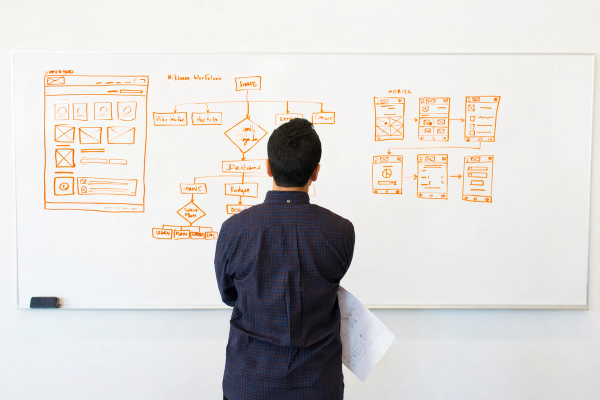
Once your information architecture is defined, the next crucial step is to create wireframes and user flow diagrams. This process translates your site's structure into a tangible visual blueprint, focusing on layout, functionality, and user journeys without the distraction of colours or imagery. It serves as a critical bridge between abstract strategy and final visual design, ensuring that usability is prioritised from the outset. This planning is a non-negotiable part of any robust website redesign checklist.
Wireframes act as the skeleton for key pages, mapping out content hierarchy and interactive elements, while user flow diagrams chart the paths users will take to complete important tasks. By visualising these elements early, you can identify potential navigation issues and functional gaps before costly development work begins, saving significant time and resources.
Focus on creating clear, functional blueprints that align with user goals and business objectives.
Develop Key Page Wireframes: Start by wireframing your most critical pages, such as the homepage, product or service pages, and the checkout process. For a SaaS platform, this might include the onboarding sequence and dashboard. The goal is to define the placement of content, forms, calls-to-action, and interactive components.
Map Primary User Flows: Create diagrams that illustrate the step-by-step journey for primary tasks. For an e-commerce site, this would be the path from product discovery to purchase confirmation. For a content-heavy site, it might be the flow from a blog post to a newsletter sign-up.
Adopt a Mobile-First Approach: Begin the wireframing process by designing for the smallest screen first (mobile). This forces you to prioritise the most essential content and features, ensuring a clean and focused user experience that can then be progressively enhanced for larger screens like tablets and desktops.
Actionable Tip: Test your low-fidelity wireframes with a small group of real users. Provide them with a simple task, like "find the pricing information" or "sign up for a trial," and observe their journey. This early feedback is invaluable for validating your navigation and layout assumptions before committing to the full design.
With a solid strategy and sitemap in place, the next crucial step is to translate your vision into a tangible, interactive preview of the final product. High-fidelity mockups are polished, pixel-perfect static designs that show exactly how the website will look, incorporating your brandâs colours, typography, and imagery. Prototypes take this a step further by adding interactivity, allowing stakeholders to click through user journeys and understand the siteâs flow and functionality before a single line of code is written.
This stage is essential for validating design decisions, gathering early feedback, and providing developers with a clear blueprint. By simulating the end-user experience, you can identify usability issues and refine interactions early on, saving significant time and resources during the development phase. Including this in your website redesign checklist ensures a smoother transition from design to launch.
The goal is to create a realistic representation of the final product, covering key user flows and interaction states.
Create Visual Designs: Using tools like Figma or Adobe XD, build out high-fidelity mockups for key pages based on your wireframes and new brand style guide. Focus on visual hierarchy, spacing, and component design to create a polished and cohesive look.
Develop Interactive Prototypes: Link the static mockups together to simulate user navigation. Build out key interactive elements like dropdown menus, form submissions, and button hover states. For example, prototype the entire checkout flow from adding an item to the cart to the final confirmation screen.
Design for All States: Go beyond the "happy path" and design for different scenarios. Include mockups for empty states (e.g., an empty shopping cart), loading indicators, success messages, and error notifications (e.g., invalid form entry). This ensures a comprehensive and user-friendly experience.
Actionable Tip: Use real content, not placeholder "lorem ipsum" text, in your mockups and prototypes. Using actual headlines, body copy, and images reveals potential layout issues and ensures the design effectively supports the content. This also helps stakeholders give more meaningful and accurate feedback.
Choosing the right technology is a cornerstone of a successful website redesign, directly influencing your site's performance, scalability, and long-term maintenance. This stage involves a critical evaluation of your current technology stack and a strategic decision on the tools, frameworks, and infrastructure for the new site. A well-planned technical foundation prevents future bottlenecks, reduces technical debt, and ensures the platform can evolve with your business needs, making it an essential part of any comprehensive website redesign checklist.
This process goes beyond simply picking the latest trends; it's about aligning technology choices with your specific business goals, performance targets, and team capabilities. For businesses utilising PHP, the Laravel framework offers a robust ecosystem to build modern, secure, and high-performing web applications. Thoughtful planning here ensures your new website is not only visually appealing but also technically sound and future-proof.
Begin by documenting requirements and evaluating how different technologies can meet them. This ensures every component of your stack serves a clear purpose.
Framework and Version Selection: Confirm the core technology. For a Laravel project, this means choosing a recent, long-term support version like Laravel 10+ to benefit from the latest security patches and features. The choice between a traditional multi-page application or a single-page application (SPA) using Vue 3 will dictate the entire frontend architecture.
Component and Package Review: Identify key functionalities and select appropriate tools. For instance, you might choose Laravel Livewire for building dynamic interfaces with minimal JavaScript, or implement Laravel Echo with Pusher for real-time features like notifications. Leveraging established packages from the Laravel ecosystem, such as Sanctum for API authentication, saves development time and ensures reliability.
Infrastructure and Deployment Strategy: Plan your hosting and deployment pipeline. Options range from traditional servers to modern, serverless solutions like Laravel Vapor for auto-scaling on AWS. This decision should align with your traffic expectations, budget, and scalability requirements. Integrating a Content Delivery Network (CDN) from the outset is crucial for optimising global load times.
Actionable Tip: Create a "Technology Decision Record" document. For each major technical choice (e.g., database, caching engine, frontend framework), document the options considered, the final decision, and the rationale behind it. This record becomes invaluable for onboarding new developers and making informed architectural decisions in the future.
A successful website redesign culminates in a seamless transition from the old site to the new. This requires a meticulous migration, testing, and launch strategy to preserve SEO value, ensure data integrity, and minimise service disruption. A well-organised plan prevents broken links, lost traffic, and user frustration, making it an essential component of any website redesign checklist. It turns a potentially chaotic launch day into a controlled, predictable event.
This process involves mapping out every step of the transition, from moving content and data to redirecting old URLs and conducting final tests. For example, an e-commerce site must ensure all product data, customer accounts, and order histories migrate flawlessly, while a media site must protect its content archives and search rankings. A methodical approach safeguards the value you've built and sets the new site up for immediate success.
Start by creating a detailed, step-by-step plan that covers pre-launch, launch, and post-launch phases.
Content and Data Migration: Create a complete inventory of all content and data assets. Map old URLs to their new equivalents and prepare a 301 redirect file to guide search engines and users. For a SaaS platform, this involves migrating user accounts and settings without interrupting service.
Comprehensive Testing: The new site must be rigorously tested in a staging environment that mirrors the live server. This includes functional testing, cross-browser compatibility, mobile responsiveness, and performance load testing to ensure it can handle peak traffic. Dive deeper into this crucial phase with our comprehensive web application testing checklist.
Launch and Monitoring: Plan the launch for a low-traffic period, such as a weekend or early morning. Prepare a rollback plan in case of critical issues. Once live, implement 24/7 monitoring to track server performance, check for errors, and validate that analytics and conversion tracking are functioning correctly.
Actionable Tip: Implement a "soft launch" or phased rollout. This could involve releasing the new site to a small internal audience first, or launching it in a single geographic region. This approach allows you to identify and fix unforeseen issues with a limited audience before the full global launch, significantly reducing risk.
Item Implementation complexity Resource requirements Expected outcomes Ideal use cases Key advantages Audit Current Website Performance and User Behavior Medium â requires analytics setup and expert analysis Analytics tools, UX analyst, time for data collection Baseline metrics, prioritized pain points, performance insights Pre-redesign, conversion optimization, performance troubleshooting Data-driven prioritization; reduces redesign risk Define Clear Business Objectives and KPIs LowâMedium â stakeholder alignment workshops Stakeholder time, KPI tooling/dashboard Measurable goals, scope control, success criteria Project kickoff, budgeting, stakeholder alignment Clear direction; measurable success; prevents scope creep Competitive Analysis and Market Research Medium â systematic research and synthesis Research tools, analyst time, market access Benchmarks, feature comparisons, differentiation ideas Market entry, feature prioritization, UX benchmarking Informs positioning; reveals opportunities and trends User Research and Audience Segmentation MediumâHigh â recruiting and qualitative research Researchers, participants, testing tools Personas, journey maps, validated user needs Personalization, accessibility-focused design, UX-led projects Reduces assumptions; improves satisfaction and targeting Plan Information Architecture and Site Structure Medium â card sorting and sitemap design UX designers, content owners, validation tools Improved discoverability, SEO-friendly structure Content-heavy sites, e-commerce, complex navigation systems Better findability; scalable content organization Design Visual Identity and Create Style Guide MediumâHigh â design system creation and documentation Designers, brand stakeholders, design tooling Consistent visual system, reusable components, accessibility Brand refresh, multi-product ecosystems, large teams Consistency across pages; faster development via components Create Wireframes and User Flow Diagrams LowâMedium â iterative design and review UX designer, prototyping tools, stakeholder feedback Functional blueprints, validated flows, reduced dev rework Complex interactions, early validation, stakeholder alignment Early usability validation; inexpensive iterations Develop High-Fidelity Mockups and Prototypes High â polished visuals and interactive specs Senior designers, prototyping tools, time for polish Realistic prototypes for testing and handoff Final design sign-off, usability testing, developer handoff Accurate validation; clearer dev specs; stakeholder buy-in Technical Planning and Technology Stack Review High â architectural decisions and planning Engineers, architects, infrastructure and monitoring tools Scalable, secure tech stack; CI/CD and monitoring plan Large builds, scalability/performance needs, Laravel projects Prevents technical debt; aligns stack with goals Migration Planning, Testing, and Launch Strategy High â coordination, comprehensive testing DevOps, QA, monitoring, content managers Safe launch, preserved SEO, minimal downtime Replatforming, full site migrations, high-traffic launches Reduces launch risk; preserves SEO; rollback readiness
Navigating a website redesign is a formidable project, but it is far from an insurmountable one. By systematically working through this comprehensivewebsite redesign checklist, you have transformed a potentially chaotic endeavour into a structured, strategic process. You have moved beyond simple aesthetics, delving into the core components that create a high-performing digital asset: from initial performance audits and defining clear business objectives to meticulous technical planning and a robust launch strategy. This is not just a to-do list; it is a strategic blueprint designed to align every decision with your ultimate goals of growth, engagement, and profitability.
The journey you have mapped out ensures that your new website will not just look modern but will function as a powerful engine for your business. It will be built on a deep understanding of your audience, a solid information architecture, and a technical foundation, perhaps even utilising the power of Laravel, that is both scalable and secure. This methodical approach minimises risks, prevents costly oversights, and maximises your return on investment.
The true power of this checklist lies in its dual nature. It is both a guide for the redesign project and a foundation for what comes after. The launch of your new site is not the finish line; it is the starting pistol for a new race of optimisation and refinement.
Embrace the Data: The KPIs you established in the planning phase now become your real-time feedback loop. Use tools like Google Analytics and user behaviour analytics platforms to monitor performance against your goals. Are conversion rates improving? Has the bounce rate decreased? Is user engagement on key pages higher?
Listen and Adapt: Your new site is a live environment. Solicit feedback through surveys, support channels, and on-site widgets. User feedback is an invaluable resource for identifying friction points and opportunities for enhancement that data alone might miss.
Iterate, Don't Stagnate: Treat your website as a dynamic entity. The digital landscape, competitor strategies, and user expectations are constantly evolving. Schedule regular reviews (quarterly is a good starting point) to assess performance, identify areas for improvement, and plan for iterative updates rather than waiting years for another massive overhaul.
You are now equipped with a detailed, actionable framework. The critical next step is to put it into motion. Begin by assigning ownership to each phase of the checklist, whether to internal team members or an external partner. Establish realistic timelines and ensure clear communication channels are in place from day one.
Remember that a successful website redesign is a testament to strategic foresight and diligent execution. By following thiswebsite redesign checklist, you are not just building a new website; you are architecting a better future for your business's online presence. You are creating a platform that not only meets the demands of today's users but is also agile enough to adapt to the challenges of tomorrow. This structured approach ensures every pound and every hour invested contributes directly to a more engaging, efficient, and ultimately more profitable digital experience. Now, it is time to build.